Global Expressions, Explained
What they are, how they work, and some awesome use cases

Okay, so global expressions are now a thing. And what’s been promoted as a nice quality-of-life release is actually underselling it. In my view, this is a pretty significant improvement to the product as a whole.
There are two ways to build a piece of software, and Bubble has always sat firmly on one side of the divide.
The first way is the one most traditional developers learn. You write the logic of your application in one place, and you write the interface in another. They’re kept apart on purpose. The text element that displays a cart total doesn’t know how the total was calculated. It just asks. The code that does the calculation lives somewhere else, in its own file, within its own folder. If you change how you calculate the total, the text element doesn’t change, it still asks and just gets a different answer.
The second way is the one Bubble developers are used to. The logic of your application lives where it’s used. The expression that calculates a cart total lives on the cart page. The conditional that hides an admin button lives on the admin button. The expression that loads a repeating group lives on the repeating group. There’s no separate file, no central registry, no hidden architecture. The logic is right there, in the thing it controls. In a sense, you see the app the same way your users see it: a button should do something, so you tell it what. This is one of the reasons hundreds of thousands of non-developers have managed to build working apps in Bubble. The logic is exactly where you’d expect to find it.
Where the two approaches meet is when the app starts to grow in complexity. For a simple app, Bubble’s approach is just easier. As the app grows more complex, perhaps with thousands of users each using it in their own way, the gravity of Bubble’s fragmented approach starts to show up. You realize that a core expression is living in five different places. Every piece of duplicated logic is somewhere a bug or a security gap can hide. Every change requires you to find and update every copy. This is when a centralized approach starts to make sense.
There are already ways to emulate a centralized logic, and experienced Bubble devs use them all the time: reusable elements with custom properties, custom events, API workflows, privacy rules. These all open up ways to centralize big parts of your app’s logic, including expressions. Global expressions don’t let you do anything you couldn’t do before, but they’re a nice step toward being able to do it with less effort, and a lot less duplication.
So let’s look at what they actually are.
What are they?
Well, they’re expressions. But global.
Ok, so let’s unpack that. Every time you need to fetch data, calculate something or compare something, you use a dynamic expression. This is essentially Bubble’s programming language – the place where you interact with data. Of course, you knew this.
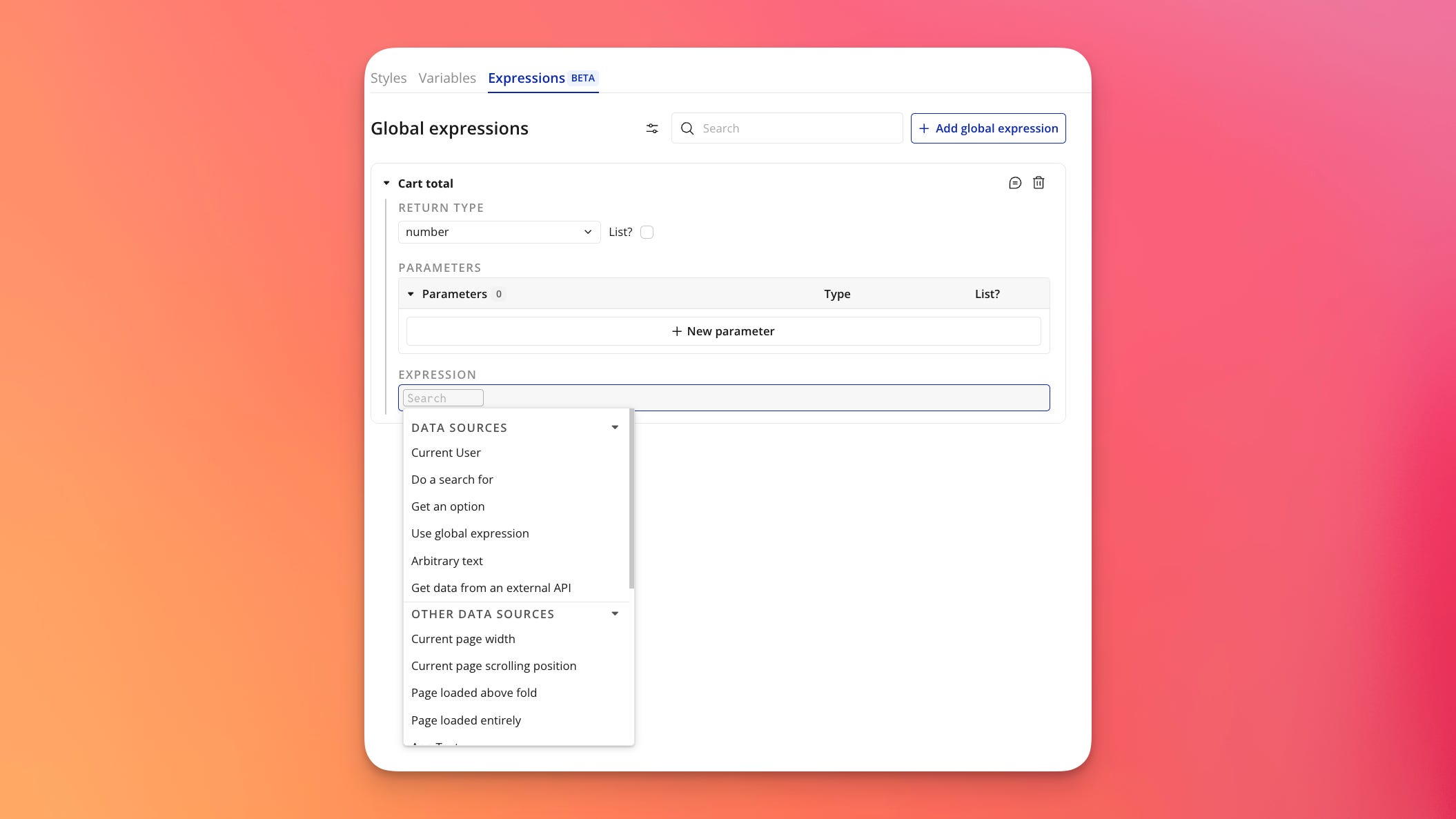
As you may have guessed by now, global expressions are a kind of reusable element for expressions. Build it once, and use it everywhere in your app. Obviously, this is useful for a few basic reasons:
It means you can change a dynamic expression used in 20 different places, with just one edit
It also means you don’t need to look for it: it’s right there in the Global tab, which replaces the Style tab.
Additionally, you can give it a clear label, making it easy to spot inside of any expression where it’s used.
Parameters
Ok, so that’s the basic premise. A handy tool to keep your expressions in one, central place. But they have another interesting feature: they allow for parameters.
What this means in practice is that you can set up an expression with the basic things down, and then tailor that expression anywhere it’s used. For example, you can set up a Do a search for with a few basic constraints, and then add more as needed.
This is useful in general, of course. Let’s say you have a SaaS of some sort, for example. You’re already separating organizations with privacy rules, so each company’s data is siloed away from every other company’s. That’s the security layer. Done. But inside a single organization, you could have teams. Sales, marketing, support, engineering. And while users from the same company are allowed to see each other’s data (no privacy rule needs to block them), in practice each user only wants to see their own team’s stuff.
This is the kind of constraint that could end up duplicated across half your app. With global expressions, you can set it once. Do a search for, where the things’s team equals the current user’s team.
That’s one obvious use case, but look at some other potential ones.
Use cases
You’ll have to bear with me here, the feature is brand new, so I may be missing some obvious ones or fail to take something into account in the ones I do list. But, at the top of my head:
Permission logic
If you’re working with user roles you’ll have the same permission checks scattered across forty different places in your app. “Is the current user an admin”, assuming in this example that admin is an option set. You’ll use this both in the UI (conditionals hiding/showing sections, settings, buttons, menu options) and in workflows (only when).
With global expressions, you can set it once, name it (“User is admin”) and place the same expression anywhere. If, at a later point you add a role level above “admin”, such as “super admin”, you can update just one expression and it cascades into every part of your app.
Privacy rules centralized database access control from the beginning, and with global expressions, we’re one step closer to centralizing permission logic for elements and workflows too.
Date math
You know the expressions I mean. Current date/time +(years) 1 +(months) 3 +(days) -30 :rounded down to day. They live in ten places in your app and every one of them is slightly different.
Some of them are rounded, some aren’t. Some use the user’s timezone, some don’t. Your ‘last 30 days’ report shows different numbers than your ‘last 30 days’ filter, and you spend a Tuesday afternoon figuring out why. Setting it up in a global expression, you can give them names like “last 30 days”, “Start of this month” and “Yesterday.”
Pretty sweet.
Status checks
Anything with states. Orders. Tickets. Subscriptions. Bookings. Instead of writing expressions like “Order’s status is Pending or Order’s status is Awaiting Payment or Order’s payment_due_date is less than current date.”, you can set up one global expression and clean up your in-app expressions.
You can use it in searches:
“Pending orders”
“Past due invoices”
“Orders awaiting payment”
Or even a fuller global expression, “Order is actionable”, covering multiple conditions.
You can also use it in conditionals:
Event - only when: “Order is pending”
Button Pay Now: When “Order is paid” then this element is visible=disabled
Nothing you couldn’t do before, but tidier.
Formatted strings
Naming conventions like:
Current user’s last name, Current user’s first name= “First name, last name”Current user’s First name Current user’s last name= “Full name”Current user’s First name:truncated to 1 Current user’s Last name:truncated to 1= “Initials”
The same thing can be done with things like dates:
Current date/time:formatted as m/d/yy= “US date”Current date/time:formatted as d/m/yy= “European date”
Pricing calculations
If your app has a pricing calculation that involves the user’s plan, their seat count, an optional discount code, a tax rate based on country, and a proration factor if they upgraded mid-cycle. That expression is currently living in your checkout page, your invoice page, your admin override page, your “upgrade preview” modal, and your billing API call. Each one was written separately, at least one of them is messed up, and you don’t know which.
Build “Calculate subscription total” as a global with the user and the plan as parameters, and every place that needs to know the subscription total reads from the same calculation. One source of truth.
Unit testing
This one’s not as sexy, and may need some explaining. When a professional developer writes a piece of code that does something important, like “calculate the total price of an order” or “decide whether this user is allowed to see this page,” they don’t just write the code and hope it works. They also write a second, separate piece of code whose only job is to check the first piece of code.
The second piece of code does something like this:
“Hey, calculate the total price for an order with two items at $10 each. The answer should be $20. Did you get $20? Yes? Good. Now try one item at $10 with a 50% discount. The answer should be $5. Did you get $5? Good.”
This is called a unit test. The “unit” is one piece of logic. The “test” is the automatic check. Developers write dozens or hundreds of these for any serious application. Then, every time someone makes a change to the code, all the tests run automatically. If any of them fail, the developer knows immediately, before the change ships to real users.
The whole point is to catch mistakes early. Without tests, you change one thing in your code, and three weeks later a customer emails you because their invoice is wrong. With tests, you change one thing, the test fails immediately, and you fix it before anyone outside your home office ever sees it.
Bubble doesn’t really have a way to do this. The reason is what we explored in the introduction to this article. The logic isn’t a separate thing you can grab and test in isolation. It’s stitched into the UI.
Let’s say you are running an eCommerce site, again with some pricing logic. You calculate the total price of items in a cart, a percentage discount on a product, etc.
For an app that scales, you’ll want to test this logic properly before pushing anything live. For example, you could create a testing page, where you set up rows of tests like:
Discount test
Cart total sum test
Each row has a few settings (allowing you to select a product to calculate a discount on, and add products to a test cart).
Selected product | Global expression “Calculate discount” | Expected result
Items in cart | Global expression “Calculate total” | Expected result
Technically, you could attempt this kind of testing before global expressions came along. But you’d have to copy-paste your real logic into the test page, which means you wouldn’t actually be testing your real logic. You’d be testing a copy. And copies drift. You update the cart page expression on a Wednesday, you forget to update the test page version because you’ve been working for nine hours and your cat is meowing hungrily in the background, and from that point on your tests are happily passing while your real app silently produces wrong numbers.
Global expressions fix part of this, but not all of it. The logic now lives in one place: change the calculation, and every expression picks up the change. That’s a real improvement. What global expressions don’t fix is the parameters. The cart page calls the expression with the cart page’s version of “selected cart” and “current user.” The test page calls it with its own version of the same things. If the two pages are passing in subtly different inputs (the wrong user, a cart that’s missing a field, a product that doesn’t have the same configuration), the test runs the same logic against different reality and passes anyway. The drift moves one layer deeper: from the logic itself to the data you feed it.
This isn’t a Bubble problem specifically. Every software ecosystem with reusable code has to deal with it. The standard solution is to be deliberate about what your test inputs represent: build them to match the shape of real production data as closely as possible, and update them when production data changes. But it’s worth knowing that global expressions aren’t a magic fix for test reliability. They centralize the logic and define its parameters. They don’t centralize what you feed into those parameters. Both layers need attention.
If you’re a software developer: yes, this is a very rudimentary test. A real testing setup could run automatically every time you saved a change, would tell you immediately if anything failed, and would potentially cover thousands of scenarios. Imagine Amazon, selling millions of different products with different configuration options. Without tests, you might not discover until a year later that the RAM upgrade option on every laptop you sold was being silently dropped from the final price calculation, and you’ve been giving customers free upgrades for twelve months.
Unit testing is how you catch bugs like that before changes go live, and while the way I’ve described is pretty basic – hey, it’s a start.
If you’ve made it to the bottom of an article about a feature that was announced this morning, you and I are clearly the same kind of person. Pleased to meet you. I’ll probably look back at this article in six months and realize I missed three obvious use cases. If any of them are obvious to you right now, the comment section is a generous place to point that out.
Thanks for the detailed explanation Petter, very useful.
The unit test use case is something I did not think about and looks like it will be a really useful. And once the Tests feature is released this will be a great way to reuse these expressions. I'm quite excited for the future of bubble now.
As you say about the parameters ... would be great if they added to this 'Global Values' ... state variables that are accessible (to read and to change) everywhere, by any page, any reusable. At the moment so much hassle is generated by having to figure out how to get a reusable to 'pass up' information, and the global variable plugins (at least the ones I've tried) come with a nasty overhead in terms of slowing down bubble...
Im all up for keeping data as localised as possible, but sometimes a handful of global states could transform the way an app can work...